The Producer's Guide to Generative AI Sound Design (No Hype, Just Workflow)
How you can actually use AI and new tech in real life, human-centric creative workflows.
15 min read · Updated March 2026 · Written by real, human producers
Generative AI in music is one of the most overhyped and under-explained topics in production right now. You've seen the breathless think-pieces ("AI will replace producers!") and the equally breathless dismissals ("soulless, unlistenable garbage"). Neither is useful, for the most part :)
This guide is for producers who want to understand what generative AI actually does, where it genuinely helps, where it falls short, and how to integrate it into a real working session without turning your music into something that sounds like a machine made it. Because it shouldn't.
What "generative AI" actually means in this context
Generative AI refers to machine learning models that create new content — audio, images, text — by learning patterns from large datasets of existing content and then generating new material that reflects those patterns without directly copying the source.
In music production specifically, this means models that can:
Generate audio samples from an input (i.e - text descriptions)
Create full compositions from prompts or style references
Extend or transform existing audio
Generate MIDI patterns, chord progressions, or melodies
These are different technologies solving different problems. This guide focuses on sample generation — using AI to create individual sounds (particularly drum one-shots) directly in your DAW. We'll note where the other applications fit.
Why sample + instrument generation is the most practical AI application right now
Full AI composition tools (Suno, Udio, etc.) are impressive as demos but introduce a fundamental creative tension: if the model generated the entire track, whose music is it? Most producers aren't looking to hand over composition — they're looking to solve specific workflow bottlenecks.
Sample and instrument generation solves a concrete, daily problem: getting the right sound into your session fast. You still compose. You still arrange. You still mix. The AI just removes the search-and-find step from your workflow, replacing "hunt for 45 minutes on Splice" with "describe it and generate it in 3 seconds."
This is where AI earns its place in a real production workflow in 2026: not by replacing creativity, but by removing the friction between having an idea and executing it.
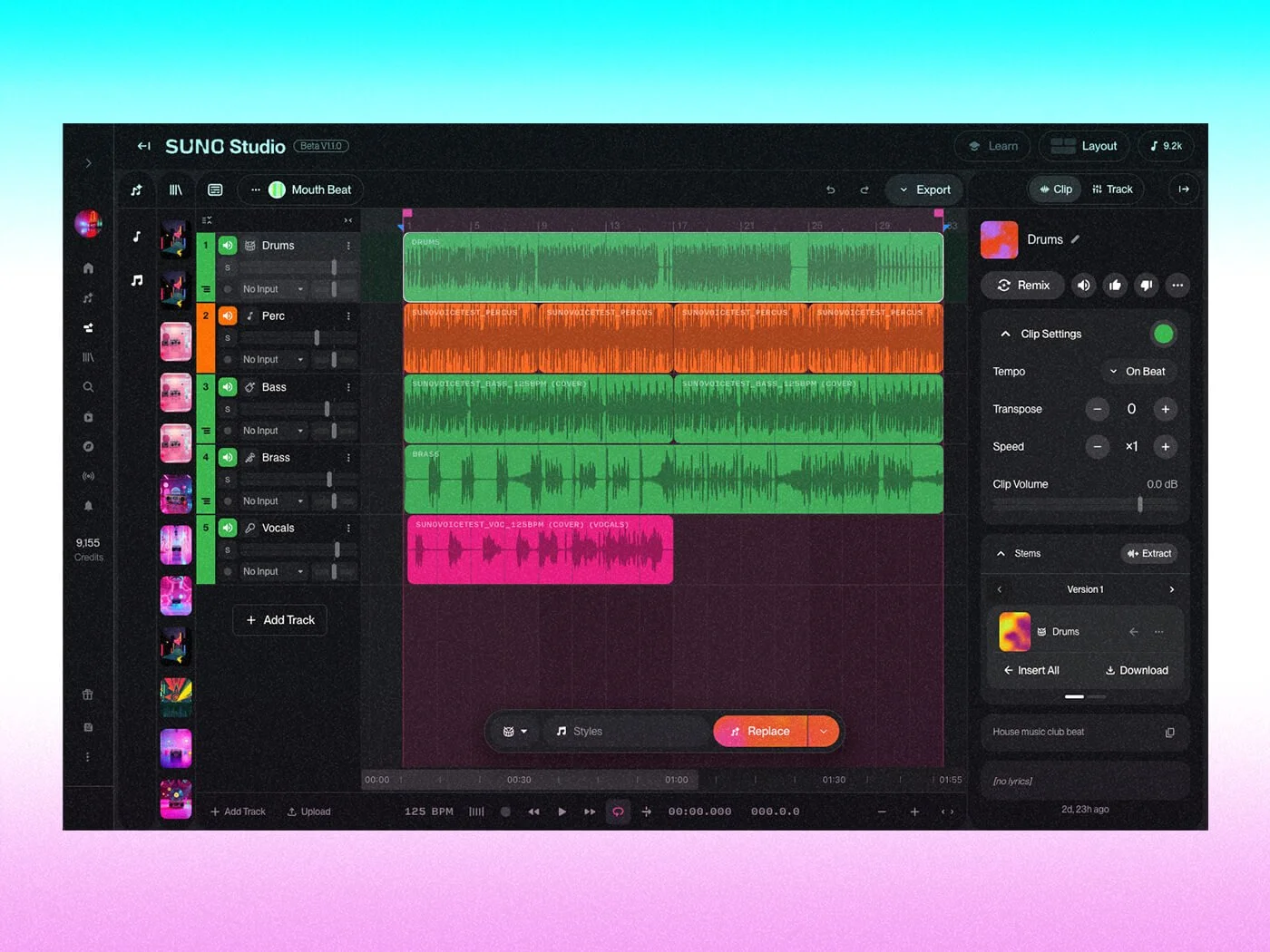
Suno Studio - generate full tracks, split stems, and generate new elements
How AI sample generation works (simplified)
At a high level, a generative audio model is trained on a large dataset of audio samples — in Just 4 Noise's case, ethically sourced sounds and instrument recordings. During training, the model learns the relationship between how sounds are described (or tagged) and what those sounds actually sound like at the audio waveform level.
When you ask for a "deep 808 kick with slow sub decay," the model doesn't search a database for a matching sound. It grabs a new waveform that reflects the patterns associated with that description in its training data. The result is genuinely new — not a found sound, not a modified existing sample, but a created-from-scratch audio file.
This is why every generated sound is unique. The same prompt run twice will produce two similar but distinct results, the same way two painters given the same subject will produce two different paintings.
The practical workflow: where AI helps most
1. Breaking the blank-canvas block
The hardest moment in production is often the first one. AI-generated samples and instruments give you a starting point that's already tailored to what you're imagining — which is far more motivating than a blank session or a generic loop pack.
2. Eliminating search time
It’s not uncommon for a producer using Splice to spend 20–45 minutes per session searching for the right sounds. AI generation replaces that with 3 seconds of describing and generating. Across a week of producing, that's hours returned to actual music-making.
3. Creating truly original sounds
Sample packs and Splice libraries are shared resources. The kick drum or vocal loop you love from that pack has been used in hundreds of other tracks. AI-generated sounds are unique by definition — nobody else has your generated output.
4. Rapid iteration
Generate 5 variations in seconds. Compare them in context. Pick the best. Iterate. This kind of rapid sound exploration used to require synthesis expertise. With AI, it requires a simple input.
Where AI falls short (be honest with yourself)
It's not magic. Vague prompts produce vague results. "Cool snare drum" will get you something generic. "Deep 808 with slow decay, heavy sub body, and no click" will get you something specific and useful. The quality of output reflects the quality of input.
It doesn't replace arrangement intuition. AI can give you a great kick. It can't tell you where the kick should sit in your arrangement, how it should interact with your bassline, or when to drop it out for impact. That's still yours.
It works best for sounds you can describe. If you're in an exploratory phase and genuinely don't know what kind of sample you need, browsing (Splice or even a small curated library) might serve you better. AI generation shines when you have a clear sonic vision.
Not all AI tools are equal. Training data quality, model architecture, and ethical sourcing vary enormously between tools. An AI tool that was trained on scraped, unlicensed audio carries legal and ethical risks that a well-built tool doesn't. Ask before you use.
Integrating AI into your workflow: a practical framework
Phase 1 — Start with a vision, not a search Before opening any plugin, spend 60 seconds brainstorming what direction you want to go. Write it down. This forces clarity and makes the AI input more effective. Example: "For this track, I need a warm, mid-heavy kick with a short tail — something between a hip-hop 808 and a punchy house kick."
Phase 2 — Generate, don't browse Load up your generative tool of choice, choose your controls, and generate. Listen in context immediately — don't evaluate sounds in isolation. A sample that sounds strange in preview might lock in perfectly with your other elements.
Phase 3 — Shape with DSP Use built-in or external DSP controls to fine-tune. Think of it as finishing the sound rather than correcting it — you're dialing in the last 10–15% rather than rebuilding from scratch.
Phase 4 — Commit and move on This is the most important step. Once you have a sample that works well enough, commit to it and move forward. The perfect sound doesn't exist. The finished track does.
A note on creative ownership
Some producers worry that using AI tools means the music isn't "theirs." This is worth addressing directly.
When you use our tools, you are:
Writing the creative brief (the prompt)
Selecting from generated options
Shaping the sound with DSP controls
Placing and arranging it in your track
Mixing and processing it
Making every compositional decision around it
The AI is a tool in that process — a very fast, very capable tool. The same way a photographer uses a camera without being accused of not "making" the photo. Creative ownership lives in the vision, the judgment, and the execution. AI accelerates execution; it doesn't replace vision.
The state of generative AI audio in 2026
The technology is improving faster than most people appreciate. Models are becoming more specific, more responsive to nuanced descriptions, and better at edge cases and unusual sounds. In 12 months, what AI can generate will be meaningfully different from what it can generate today.
The producers who learn to work with these tools now — developing prompt skills, building personal libraries of generated sounds, integrating AI into their session workflow — will have a significant advantage as the technology matures.
The bottom line: generative AI is not going to replace you. It is going to make producers who use it better, faster, and more original than producers who don't.
Just 4 Kicks — AI kick drum generation. €99 one-time. No subscription, no usage limits, ethically trained.
