Il Workflow più Veloce per il Kick Drum nel 2026: Dal Prompt Testuale al DAW in Meno di 60 Secondi
Passo dopo passo: come passare dalla descrizione di un kick drum a un one-shot finito nel tuo DAW in meno di 60 secondi usando Just 4 Kicks.
La velocità nella produzione musicale non riguarda le scorciatoie. Riguarda la rimozione della frizione tra l'avere un'idea e avere un suono. Questo tutorial spiega esattamente come farlo per i kick drum usando Just 4 Kicks — dall'apertura del plugin all'inserimento di un one-shot generato nel tuo arrangiamento.
L'intero processo richiede meno di 60 secondi una volta che lo conosci. Ecco come.
COSA TI SERVE
Just 4 Kicks installato (scaricalo qui — €99, una tantum)
Qualsiasi DAW che accetta VST3 (Windows/Mac) o AU (Mac): Ableton Live, FL Studio, Logic Pro, Reaper, Cubase, Studio One, ecc.
PASSO 1: CARICA JUST 4 KICKS COME STRUMENTO (10 SECONDI)
Apri il tuo DAW e crea una nuova traccia MIDI o traccia strumento. Carica Just 4 Kicks come plugin strumento.
In Ableton: Crea un Instrument Rack su una traccia MIDI → inserisci Just 4 Kicks nel primo slot della catena.
In FL Studio: Apri il Channel Rack → Aggiungi → Strumento VST → seleziona Just 4 Kicks.
In Logic Pro: Traccia strumento software → apri slot plugin → Audio Units → Just 4 Noise → Just 4 Kicks.
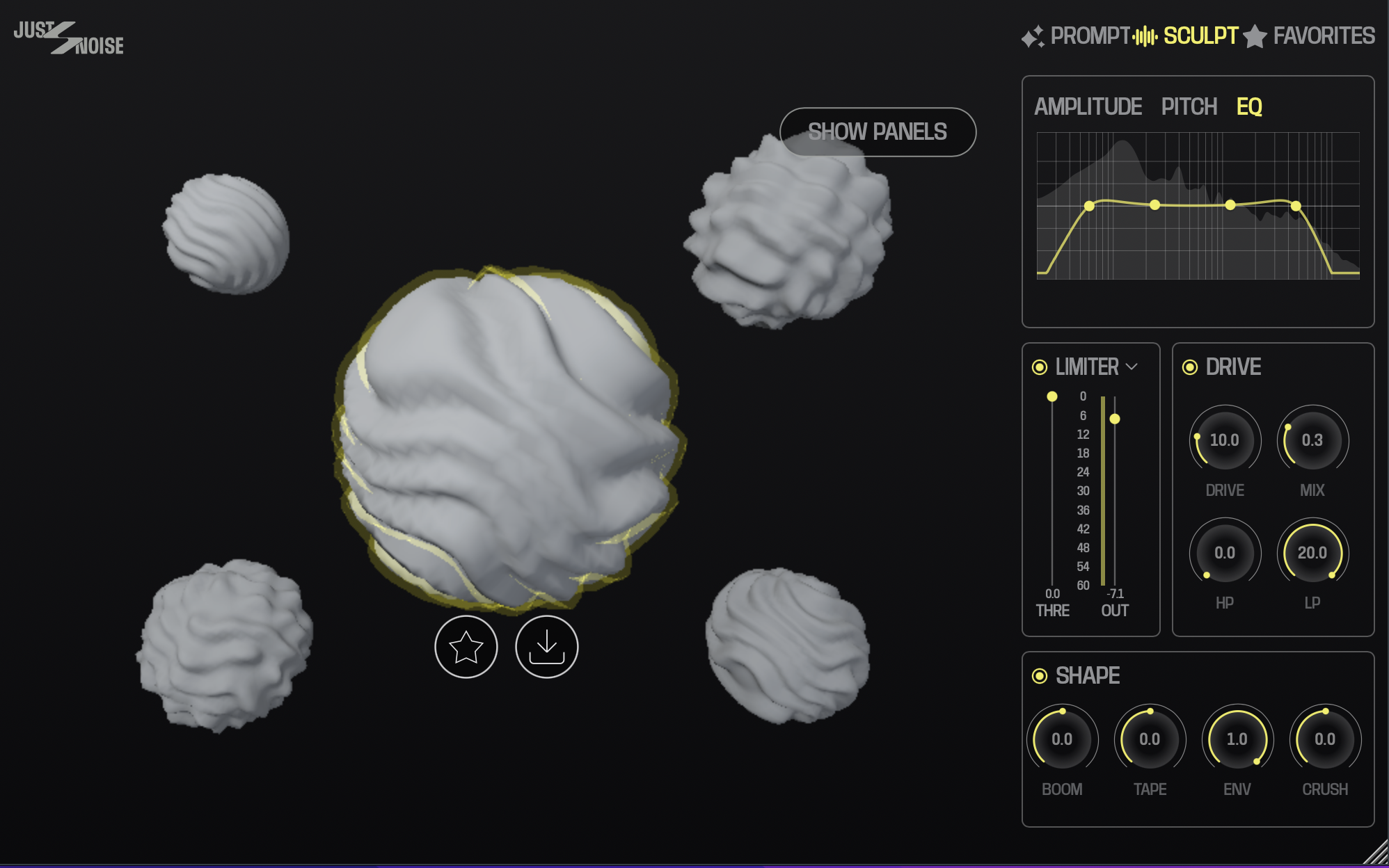
Just 4 Kicks v2, Tab Sculpt
PASSO 2: SCRIVI IL TUO PROMPT (10 SECONDI)
Qui è dove la maggior parte dei produttori si complica la vita — non farlo. Descrivi semplicemente il kick che senti nella tua testa come lo descriveresti a un altro produttore.
I buoni prompt sono specifici su tre cose:
Il carattere del basso — profondo, punchoso, ricco di sub, stretto, rotondo, boomoso
L'attacco — click, morbido, snap, thud, duro
Il decay — corto, lungo, sostenuto, stretto
Esempi di prompt:
"808 profondo con sub pesante, attacco click morbido, decay lungo e lento"
"Kick house punchoso, basso stretto, transiente duro, coda corta"
"Kick trap caldo, fondo rotondo, senza click, decay medio"
"Kick techno asciutto, punch mid-forward, decay molto corto, senza sub"
PASSO 3: GENERA (3 SECONDI)
Premi il pulsante Genera. L'IA elabora il tuo prompt e restituisce un'anteprima della forma d'onda in meno di 5 secondi.
Ascolta l'anteprima. Se è vicino ma non esattamente giusto, hai due opzioni:
Opzione A — Affina il prompt. Aggiungi descrittori più specifici: "più sub," "coda più corta," "attacco più duro." Genera di nuovo.
Opzione B — Usa i controlli Sculpt. Regola i parametri Pitch, Decay, Attack e Body direttamente nell'interfaccia. Nessun nuovo prompt necessario.
Step 4: Save to library and use (10 seconds)
Hit the Favorite star to save the sound to your personal library. Then either:
Export as WAV: Hit Export and drop the file directly into your DAW's arrangement
Play via MIDI: Trigger the sound via MIDI note C1 directly in the plugin — no export needed
Your kick is in the session. Move on.
Total time: under 60 seconds
Compare that to the average sample search workflow:
Open Splice: 30 seconds
Search "deep kick": browse 200 results: 20+ minutes
Download 8 candidates: 2 minutes
Audition in context: 10 minutes
Settle for something not quite right: 0 seconds (it just happens)
The time savings compound across a session. Across a week of producing, the difference is hours.
Pro tips
Build a library of go-to prompts. Keep a notes doc with your best-performing prompt formulas for different genres. Reuse and tweak them — this is your personal AI drum recipe book.
Generate multiple at once. Use the batch generate feature to create 3–5 variations from slightly different prompts, then pick the best.
Use the pitch control to tune to your track. Kick drums hit harder when they're tuned to the root note or fifth of your song key. Use the pitch control to dial it in.
Layer with generated sounds only. For a completely original kit, generate your snare (Just 4 Snares, coming soon) and hats (Just 4 Hats, coming soon) with the same workflow. Your entire kit is unique, royalty free, and built to your spec.
Get Just 4 Kicks → — €99, one time. Works in Ableton, FL Studio, Logic Pro, and all VST3/AU DAWs.
